Advanced editing with Microsoft Word

Advanced Editing with Microsoft Word: Enhance Your Intelligent Documents

Native integration between Legale.io and Microsoft Word for professional and collaborative document management

Legale + Microsoft Word

Draft in Word.
Keep your workflow connected.

Edit intelligent documents with the tools your team already knows. Connect drafting, collaborative review and version history with your approval and signing process in Legale.

  • Work with the Legale Word Add-in
  • Review comments and tracked changes
  • Return documents to the signing workflow
WDocument review
Home Insert Review View

Illustrative document

Service agreement


1. Scope of services

Updated clause for review
 
 
Legal review
Please confirm the revised scope before approval.

Illustrative review workflow with fictional content.

Familiar editing

Use Word’s drafting and formatting tools in your document process.

Connected reviews

Coordinate internal teams and external reviewers around the document.

Clear version history

Keep changes and reviewed versions connected to Legale.

Direct connection to Legale

Your document.
Your familiar workspace.

The Legale Add-in connects intelligent documents with Microsoft Word, helping legal, administrative and HR teams edit without manually passing copies between disconnected tools.

Keep document work connected to the approval, signature and control workflow in Legale as your team develops the next version.
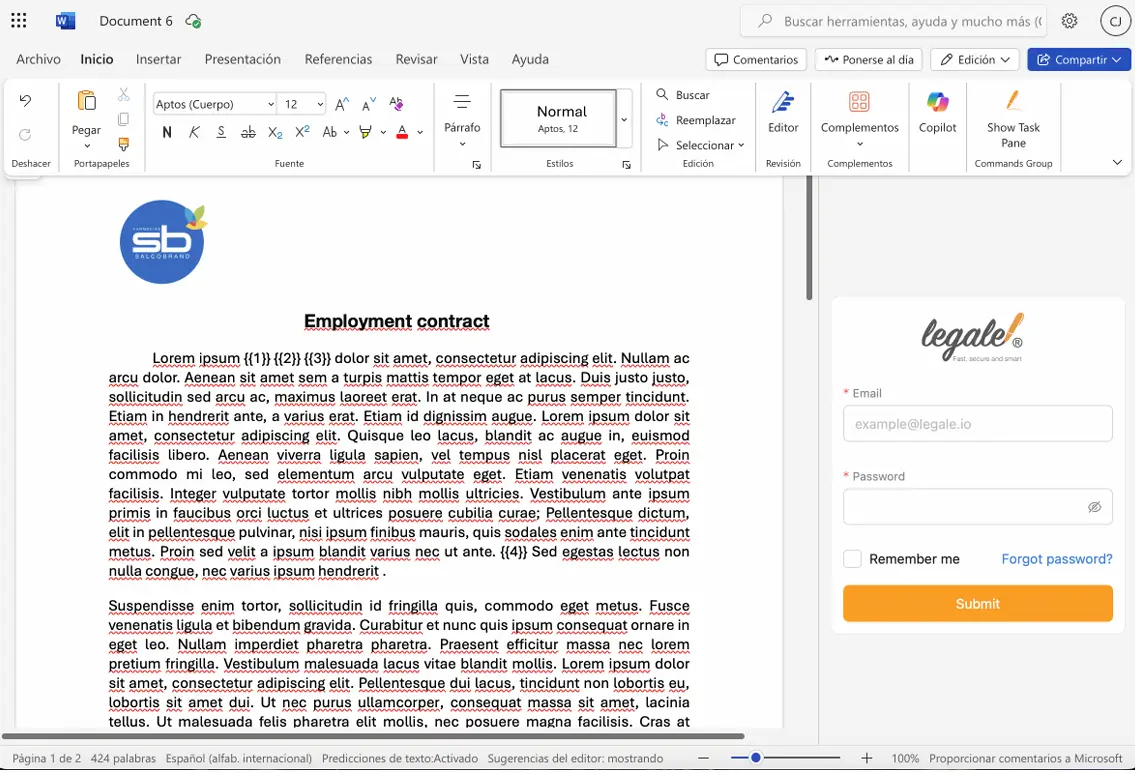
Document editing example from the Legale Microsoft Word integration

Professional editing tools

Everything you need for a thorough review.

Track changes

Review revisions and refine wording before the document moves forward.

Comments & suggestions

Bring legal questions and internal feedback into the review.

Version control

Keep reviewed versions and document history connected to the process.

Corporate formatting

Use corporate styles, institutional branding and structured clause tables.

Drafting quality

Use Word’s spelling and readability tools to improve document clarity.

Structured documents

Work with automatic numbering, bookmarks, cross-references and annexes.

How it works

From first draft to the signing workflow.

01

Open

Start with an intelligent document in Legale and open it in Word through the integration.

02

Edit

Use Word’s editing, formatting and review tools to develop the document.

03

Collaborate

Coordinate comments and revisions with internal teams and external participants.

04

Continue

Bring the reviewed document back into Legale’s approval and signing workflow.

Collaborative review

Bring the right people
into the conversation.

Use collaborative links to involve external lawyers, clients or vendors in document review. Keep their input connected to your internal coordination and the next step in Legale.

  • Coordinate legal and technical reviews
  • Consolidate feedback around the document
  • Reduce draft exchanges and manual follow-ups

A clearer record for your team

Keep reviewed versions and the history of edits available for oversight. Connect changes with the people involved and support a structured approach to corporate document policies.

  • Reviewed versions for audits and oversight
  • History of interactions and edits
  • Coordination with external counsel

Common use cases

Built around the documents your teams manage.

Contracts & agreements

Collaboratively draft employment contracts, review service agreements and align contract wording with international clients.

Legal & technical reviews

Prepare legal memos with version control and coordinate technical-area reviews before signing.

Direct connection to Legale.io

Open your intelligent documents directly from Legale.io and edit them in Word without downloading, copying, or manually managing versions. All content syncs in real-time, keeping the document within the automated approval, signature, and control workflow.

Full editing power of Word

With Microsoft Word integration, you gain access to professional tools that make a difference in legal drafting:

  • Automatic version control
  • Commenting for legal review and internal suggestions
  • Track changes.
  • Integration with corporate styles
  • Advanced spelling and readability check
  • Clause tables, automatic numbering, and smart bookmarks
  • Insertion of cross-references, annexes, or institutional branding

Real-time collaboration

Share the document securely with external users via a collaborative link, allowing external lawyers, clients, or vendors to edit and review in Word without losing control of the process in Legale.io.

 Every change is traceable. Every version is recorded. And the document remains ready to return to the signing workflow.

Tangible benefits for legal, corporate, and governance teams

Better organization and traceability

All changes are logged within the platform and linked to the user making them. This enables efficient reviews, regulatory compliance, and full control over the contract lifecycle.

Time savings and fewer errors

Avoid sending drafts by email, confusing versions, or doing manual follow-ups. Everything happens in one environment: Word + Legale.io

Contract workflow automation

From document creation to final signature—through legal reviews and external approvals—everything flows automatically within the Legale ecosystem

A professional experience for all parties

 Clients, legal departments, and vendors enjoy a modern, frictionless experience. Technology barriers are eliminated, boosting operational efficiency.

Specific advantages for legal governance and prosecutorial teams

  • Consolidation of reviewed versions for audits and oversight.
  • Full historical log of interactions and edits.
  • Greater transparency and adherence to corporate policy.
  • Structured coordination between internal teams and external counsel.
  • Reduced legal risks from informal document handling.

Common use cases

  • Collaborative drafting of employment contracts.
  • External review and approval of service agreements.
  • Generation of legal memos with version control.
  • Document review by technical areas prior to signing.
  • Contract alignment with international clients.

With Legale.io + Microsoft Word:

  •  You don’t lose legal control.
  •  You don’t lose automation.
  • You don’t lose digital signatures.
  • You gain flexibility, order, agility, and real collaboration.

Activate the Word Add-in today and discover why top-tier teams choose to work without friction, without email chains, and with maximum contract efficiency.

Hear directly from our valued customers!

Legale.io Makes Headlines!
Scroll to Top

Contact Us

contact with an agent

Use this form to reach our agent quickly. We're here to assist you.


Learn how we handle your information in our Privacy Policy.